
Achievement of Existing and Setting New Goals or Targets
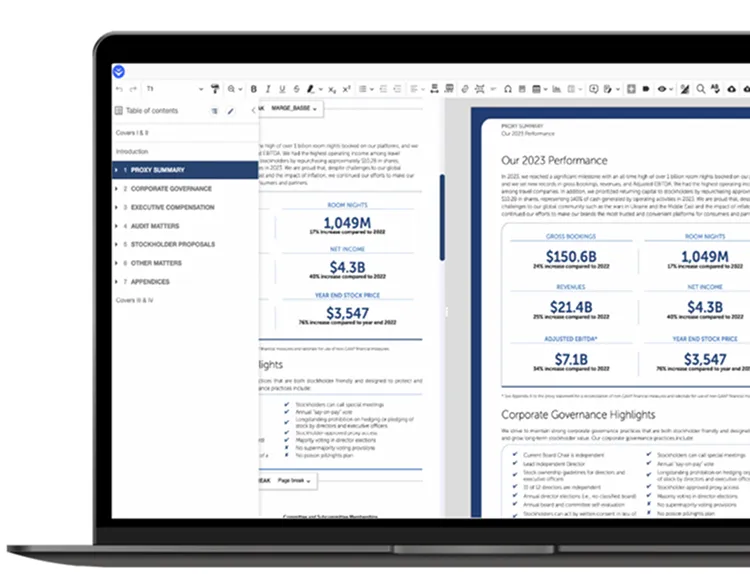
Our latest release incorporates useful features suggested by EOL users. EOL is more responsive, intuitive, and efficient than ever before.
- Blackline 2.0
- Global search & replace
- English style catalog
- Content auto format
- Selected chapter PDF export
- Customizable navigation menu
- Manual preview refresh
- SEC HTML export
- EOL data excel file last updated indicator
- Stability and performance enhancements
- Additional supported languages
- Additional supported fonts
* All features will be available as of Dec 2024.
Blackline 2.0
Tracking document revisions with a clear audit trail is a critical to preparers of disclosure. Blackline 2.0 integrates the foundational elements of traditional financial printer blacklining across PDF and Microsoft Word outputs, ensuring a precise and robust revision history.
- On-Screen Blackline 2.0
- Displayed activity within the document view
- In-line insertion and deletion marks
- Detailed revision summary
- Additional Features
- Author-based tracking for increased accuracy and speed
- New Blackline report filters
- Exported Blackline 2.0 Versions
- Paginated PDF with caret deletion and underlining insertion marks
- Non-Paginated PDF with in-line deletion and insertion content
- Detailed revision summary

EOL Preview
EOL offers powerful preview features to review your designed disclosure in real time.
EOL Preview
- Manual Refresh: Click to refresh when ready, with auto-refresh still available.
- Rendering Optimization: Faster and more accurate.
- Cursor navigation indicator: Shows exactly where your cursor is within the rendering.
- Two-way click optimization: Seamless interaction between content and rendering views.

Navigation
Navigating through your document is made easier with customizable title levels in your navigational table of contents. With one click, you can add extra title levels to your navigation panel, helping you stay organized as you navigate your document.
- Control your navigational TOC
- Title level 1 through Title level 10
- Organize your documents navigation to match your team’s workflow
- Customize which titles are visible within each level

EOL Department
EOL complements Labrador’s advisory, design, execution, and publication services. Our dedicated EOL Production department is on-hand 24h to ensure a smooth user experience, and on-demand support where necessary.
- An Expert Support Team: a team of disclosure professionals focused on supporting EOL project objectives.
- Seamless Integration: Enhanced coordination for faster, more efficient production timelines
- Tailored Support: 24h access to EOL support.
- Quality Assurance: to guarantee the highest standards in every document
- Innovative Solutions: Continuous development of new features and improvements based on your needs

EOL Department
EOL’s Dynamic Data feature ensures seamless data integration. Drag and drop Excel files, map data points, and enjoy instant updates across content—with customizable formatting and real-time indicators.
- Unlimited links within your document
- Full table, partial table, and single data point links
- No more manually updating data
- Custom data formats (X.00, X.0, and more)
- Roll-forward content mapping to jump start your draft
- EOL Data Excel File “Last Updated” Indicator

Single Sign-On
Secure your access with Cockpit’s Single Sign-On, providing a streamlined, one-click login experience for enhanced security and convenience when accessing EOL.
- Streamlined Access: One-click login eliminates the need for multiple passwords, saving time and reducing complexity.
- Enhanced Security: Centralized authentication protects your data with industry-leading security measures.
- User Convenience: Seamlessly connect to EOL using your existing credentials without any extra steps.
- Ensure compliance with data privacy regulations, such as GDPR and CCPA

Discover more about EOL and other Labrador tools by contacting us at contact-us@labrador-company.com, and explore our latest offers by visiting our catalog.